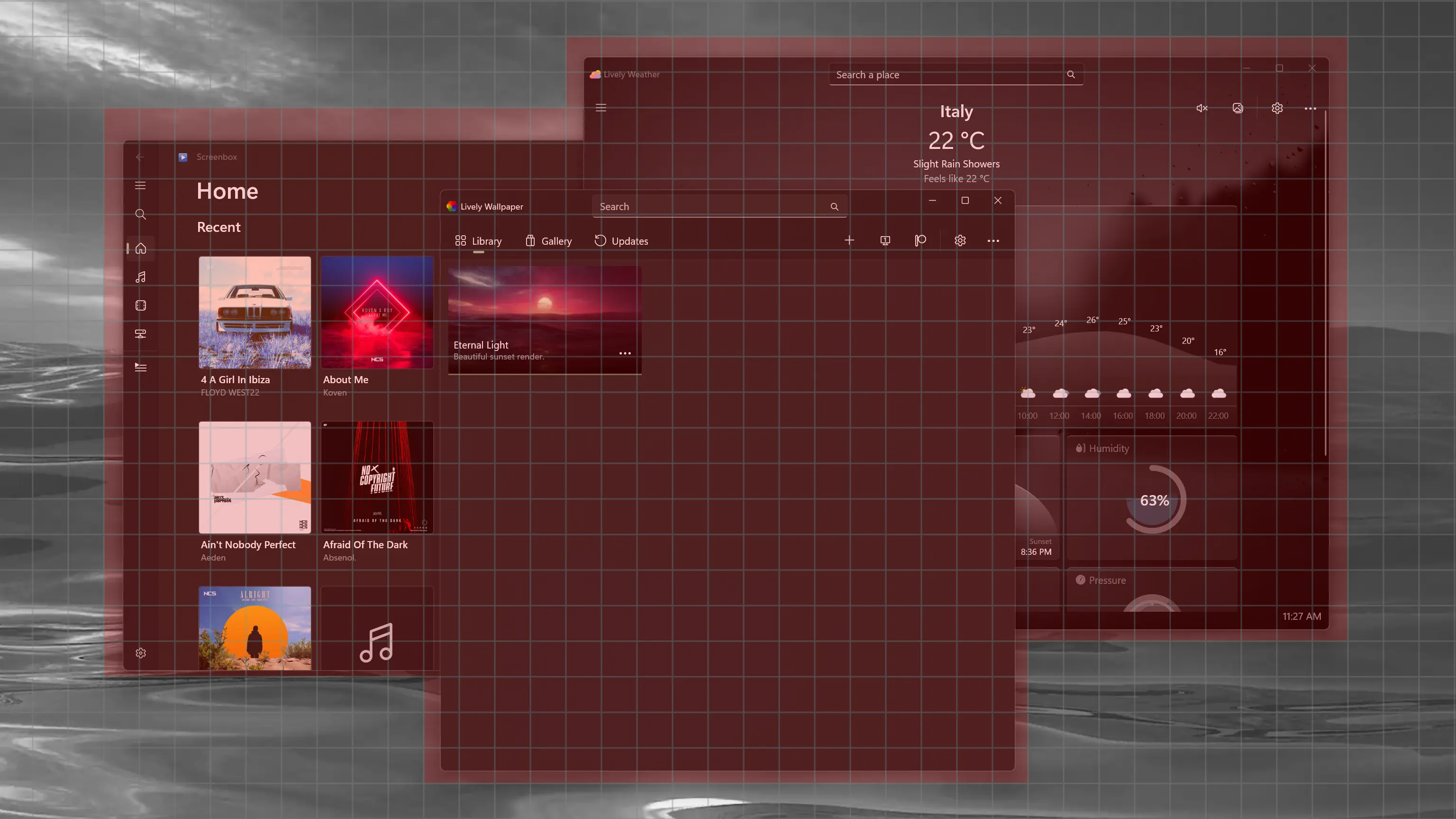
This is the biggest update in a long time and comes with better wallpaper pausing, better localization, better
screensavers and over 20+ fixes and improvements - including full compatibility with
Windows 11 24H2.
This follow-up update v2.2.1.0 builds on the previous release, bringing improvements and some bug fixes.
Grid Pause Algorithm
Replaced the default foreground window based pause detection with a grid based screen coverage algorithm - the
screen is now divided into a grid (tiles), and intersection calculation is used to check if windows are visually
covering the display.
Solves several edge cases where the previous logic failed:
Multiple windows (example: side by side), now correctly trigger pause.
Works even if a background window, not the foreground one, is covering the wallpaper.
Each display can now pause independently in per-display mode.
Reliable desktop detection.
To see the detection in real time, right-click the Lively tray icon and choose Report Bug → Grid Detection
Overlay.
Now when duplicate layout is selected all wallpapers are paused.
New All Process algorithm available in settings - scans all windows and check for fullscreen.
Changed wallpaper import system: now copies wallpaper file(s) to the wallpaper library location instead of just
referencing the original path.
Previously imported wallpapers remain unaffected - to migrate them to library location, use the Edit option
in library.
For wallpaper projects with multiple files, a confirmation dialog now shows the expected folder structure
before importing.
From this version onward, newly imported wallpapers no longer depend on the original file - you can safely
delete it without causing file not found errors.
Faster bulk imports: multiple media wallpapers are now imported faster by utilizing system thumbnail cache.
WebView2 (Default)
WebView2 is now the default browser engine for website wallpapers.
Since WebView2 comes pre-installed with Windows, the app no longer needs to bundle a browser engine, reducing
the install size by ~50%.
Now website wallpapers support H.264 media playback out of the box.
New debug DevTools, opens in a separate window.
Improved handling of media elements - when a wallpaper is paused, any playing video or audio elements on the
page are also paused automatically.
Previous CefSharp player is provided as additional download on release page.
Note: Some browser related settings will be reset to default after this update.
Screensaver Enhancements
Fade-in animation when screensaver starts, any user input during this phase cancels activation.
Introduced a grace period: if input is received shortly after screensaver starts, system lock is skipped (when
"lock on resume" is enabled).
Screensaver settings have been reorganized and are now part of the main settings page for easier access.
Audio by Display
You can now choose which display's wallpaper is allowed to play audio.
In Per-screen layout, only the wallpaper on the selected display will output sound.
Note: This feature is only available when using the "Grid" or "All process" pause algorithm.
Visualizer Audio Source
You can now choose which audio device the wallpaper visualizer uses.
The Default option follows the system's default playback device and updates automatically if the system default
changes.
If you pick a specific device, it will stay fixed and only switch if that device is disconnected.
Join the Beta Channel
Lively has grown so much over the years that it's no longer possible for me to personally test every feature or
account for every way people use it. Joining the beta and reporting any issues early is a great way to help.
You can now switch to Beta or Testing release directly from within the application.
Test releases are updated more frequently and may contain bugs - join only if you're comfortable with potential
issues.
Similarly you can switch back to the stable release, but because settings or configuration may change between
versions, you might occasionally need to delete the settings file to fully revert.
When you encounter a problem, report it in the GitHub issues and mention that you're using the beta build.
Note: This feature is not available for Microsoft Store version.
Video Enhancements
Upgraded to MPV player's new gpu-next video backend.
Better performance and improved video quality.
Enhances color accuracy and HDR passthrough support in settings.
Windows 11 24H2 Compatibility
Core components were fully rewritten to adapt to platform changes introduced in Windows 11 24H2.
Fixed a critical issue where wallpapers could enter a restart loop on this version of Windows.
No more wallpaper restarts during some system changes - a limitation of older versions has been removed.
Special thanks to Microsoft engineers and community members who reached out and helped.
Enhancements
Added new Choose a Fit option for scaling desktop picture wallpaper.
Improved MPV error messages for file loading and unknown arguments.
Added system tray tooltip for wallpaper errors when UI is closed.
Optimized page navigation for smoother and faster UI performance.
Website wallpapers now follow application theme (dark/light.)
Website wallpapers now show theme color (dark/light) while loading for the first time.
Made the screensaver setup message dismissible.
Reload command-line control now supports optional monitor argument.
set wallpaper command-line control random argument now selects a different wallpaper
if the current one is already running.
Improved error presentation in the wallpaper customize dialog.
Improved file downloader with better error handling and performance.
Improved performance of video wallpaper screenshot capture (app theme and desktop picture).
Added WebView2 install prompt when selecting it in settings if the runtime is missing.
Added in-app notification when WebView2 runtime is missing while selecting a wallpaper.
Changed wallpaper directory UI: address bar now opens the folder, side button allows selecting a new folder.
Switched from ListView to Segmented control in active wallpaper dialog.
New Grid visualizer debug tool in Diagnostic page.
(v2.2.1.0) In Span layout, wallpaper pausing depends on the "Display pause rule":
Per screen: pauses only when windows cover all screens.
All screen: pauses when a window covers any screen.
Lots of code refactoring.
Fixes
Fixed unwanted border appearing on top-left of video wallpapers. If you previously added border=no to mpv.conf
as a workaround, it's recommended to remove it now.
Fixed website login not persisting across wallpaper restarts, requires "Disk cache" to be enabled in settings.
Fixed website wallpaper having wrong display scale.
Fixed screensaver plugin required message not updating.
Fixed missing wallpaper art in screensaver dialog when preview file is absent.
Fixed screensaver stopping early with "lock on resume" enabled.
Fixed on-screen controls showing in video screensavers.
Fixed local file wallpapers not loading in WebView2.
Fixed "Restore Default" button not visible when LivelyProperty is empty.
Fixed input issues in newer CefSharp player versions.
Fixed file picker allowing multiple selections where only one was expected.
Fixed screenshot capture, theme and desktop picture not working in WebView2 player.
Fixed webpage wallpaper briefly ignoring mute setting on startup.
Fixed incorrect layout in screensaver dialog when using mirror mode.
Fixed unnecessary error messages on first startup if config files are missing.
Fixed customize tray-menu not fitting on screen in some system configurations.
Fixed FileNotFound exception when using absolute path URL wallpapers.
Fixed MPV player screenshot feature crashing on some systems.
Fixed file save dialog not opening when app is run elevated.
Fixed missing app icon in WebView2 wallpaper player.
Fixed video not looping in VLC player.
(v2.2.1.0) Fixed wallpapers not being cleaned up when a crash occurred during import.
(v2.2.1.0) Fixed incorrect update notifications inside the app.
(v2.2.1.0) Fixed application pause rules not applying correctly.
(v2.2.1.0) Fixed language translation link not working.
Updates
Updated MPV player.
Updated to .NET 9.
Updated WindowsAppSDK.
Updated dependencies (includes important security patches.)
Updated community translations.
(v2.2.1.0) Updated CefSharp player.
Known Issues
When keyboard input is enabled for wallpapers, key presses may be duplicated because the wallpaper also captures
input when focused. As a workaround, switch to mouse input mode when typing.
From the Developer
It's been a while since the last Lively update - I took a health break and have been gradually easing back into
development. During this time, I also worked on a few side projects.. cue self promotion 😁
An open-source media player based on VLC created by Tung Huynh. I contributed a real-time audio visualizer, based
on Lively’s own wallpaper visualizer.
A native DirectX powered animated weather app I’ve been building alongside. The latest update brings up to 50%
performance boost after rewriting to D2D1 shaders.